


Key Takeaways
- Form BE is the income tax return form for Malaysian residents earning employment income only (no business or freelance income).
- The e-Filing deadline for Form BE (YA 2025) is 30 April 2026, with a grace period until 15 May 2026 for online submissions via MyTax.
- Filing is 100% online through LHDN’s MyTax portal, and paper submissions are no longer accepted.
What Is Form BE?
Form BE is the annual income tax return form for individuals who earn employment income only (no business or freelance income). For the 2026 tax filing season (YA 2025), Form BE must be submitted online through LHDN’s MyTax portal by 30 April 2026, with an extended grace period until 15 May 2026 for e-Filing submissions.
This guide shows you exactly how to submit Form BE step by step, including what documents to prepare, how to enter your income correctly based on your EA Form, and how to claim tax reliefs to reduce your payable tax or maximise your refund.
If you are a salaried employee in Malaysia, filing Form BE correctly is essential to avoid penalties, stay compliant with LHDN requirements, and optimise your tax position each year.
Form BE Malaysia 2026 at a glance:
- Filing method: Online via MyTax
- Deadline: 30 April 2026 (15 May grace period for e-Filing)
- Who should file: Salaried individuals only
- Key document: EA Form
What Income Does Form BE Cover?
- Salary and wages from employment
- Bonuses and allowances
- Benefits-in-kind (BIK) such as company cars, accommodation, or medical benefits provided by your employer
- Monthly Tax Deduction (MTD / PCB) already withheld by your employer
- Eligible personal tax reliefs and rebates
Who Needs to File Form BE?
You need to file Form BE if you are a Malaysian tax resident who:
- Earns employment income only (salary, wages, allowances, BIK)
- Has no business income or freelance income
- Has an annual taxable income that exceeds the filing threshold
| Your situation | Correct form to file |
| Salaried employee, no business income | Form BE |
| Salaried employee with ANY freelance or business income | Form B |
| Self-employed / business owner | Form B |
| Non-resident individual | Form M |
If you have any business or freelance income, you must file Form B, not Form BE. Filing the wrong form can result in penalties from LHDN.
For first-timers filing income tax
If this is your first time filing income tax in Malaysia, you will need a Tax Identification Number (TIN) before you can access MyTax. Malaysian citizens and permanent residents aged 18 and above are typically registered automatically.
Form BE 2026 Deadline
| Submission method | Deadline |
| e-Filing via MyTax (standard) | 30 April 2026 |
| e-Filing grace period | 15 May 2026 |
| Paper / manual filing | Not accepted — e-Filing is mandatory |
Filing after 15 May 2026 will be treated as a late submission and may result in penalties. See the section on late filing penalties below.
What Information Do You Need Before Filing Form BE?
Before you start filing, gather the following documents and details:
1. Personal details
- MyKad (NRIC) number
- MyTax login credentials (NRIC + password)
- Bank account number (for tax refund via Electronic Fund Transfer / EFT)
2. EA Form (Statement of Remuneration from Employer)
Your employer is required to provide your EA Form by 28 February 2026. This form summarises your total employment income, allowances, benefits-in-kind, and the total MTD/PCB deducted throughout 2025. It is the primary document you need to complete Form BE accurately.
3. Tax relief supporting documents
Depending on the reliefs you intend to claim, you may need:
- Receipts for lifestyle purchases (books, electronics, sports equipment, internet)
- Medical insurance premium statements
- Life insurance / EPF contribution statements
- SSPN savings certificates (for education savings)
- Medical expense receipts (for serious illness or parents’ medical treatment)
- Childcare or education fee receipts
How to File Form BE: Step-by-Step Guide
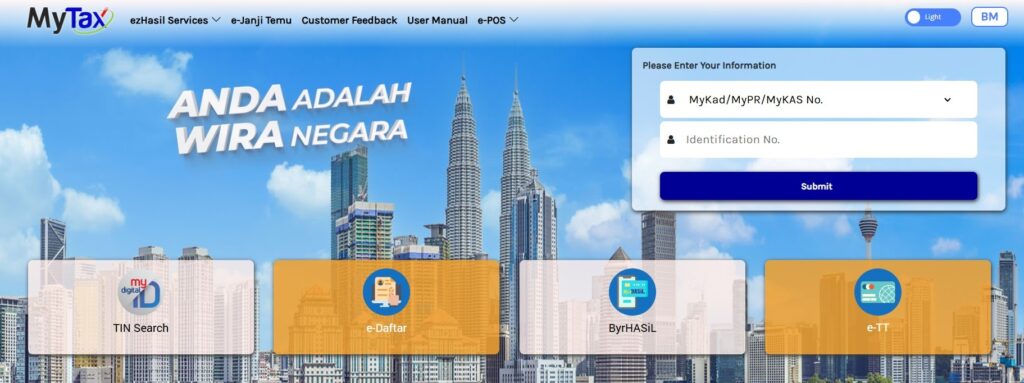
All Form BE submissions for YA 2025 must be made online through the MyTax portal at mytax.hasil.gov.my. The e-Filing system opened on 1 March 2026.
Step 1: Log in to MyTax
Go to mytax.hasil.gov.my and log in using your NRIC number and password.
Step 2: Navigate to e-Filing
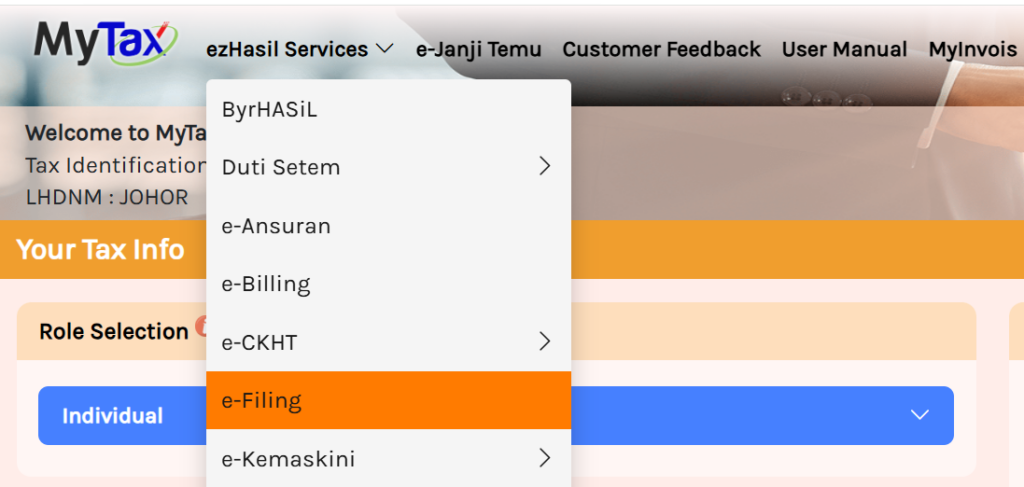
Once logged in, you will see your personal dashboard showing your current tax balance or refund status.
From the top navigation bar, click “ezHasil Services” and select “e-Filing” from the dropdown menu.
Step 3: Select Form BE for YA 2025
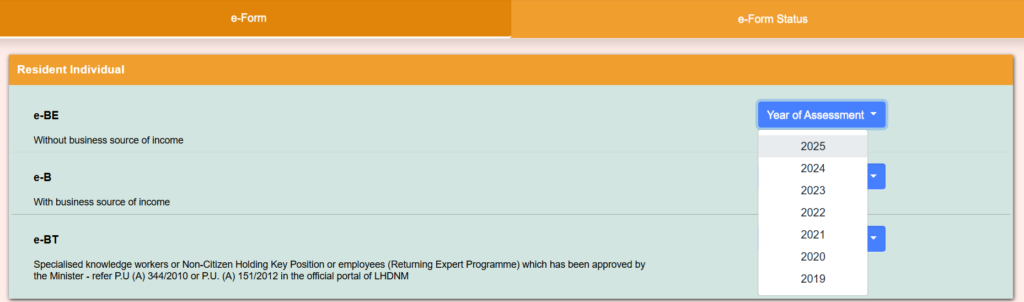
On the e-Filing page, select “e-Form”.
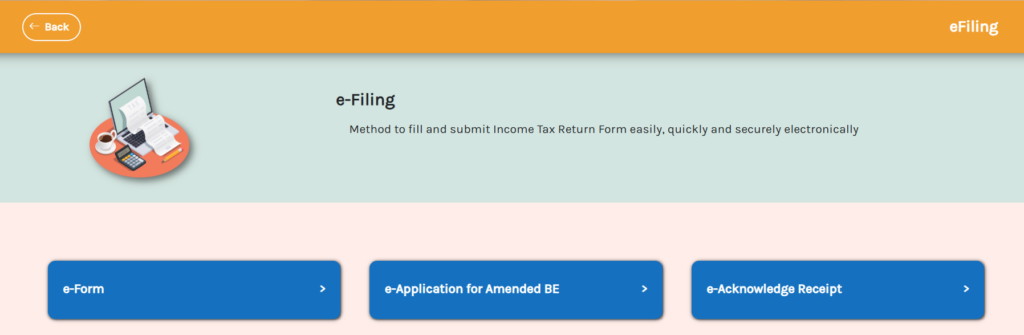
Under the “e-Form” category, you will see a list of available return forms, select e-BE and choose Year of Assessment 2025 from the dropdown.
Step 4: Verify and update your personal information
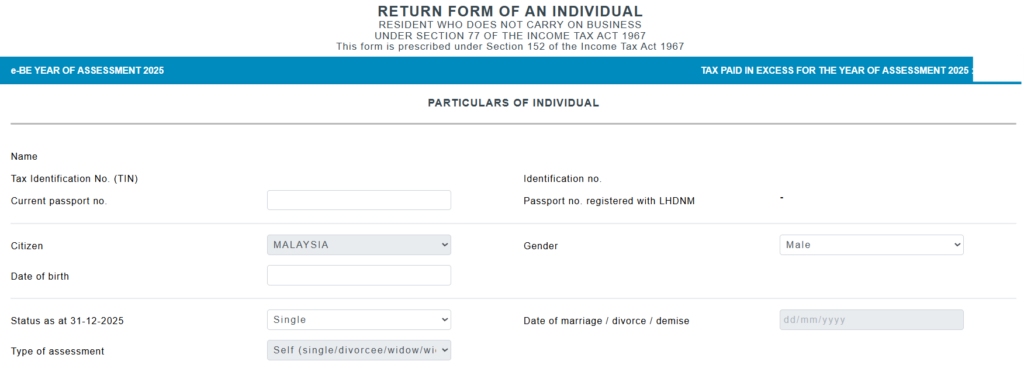
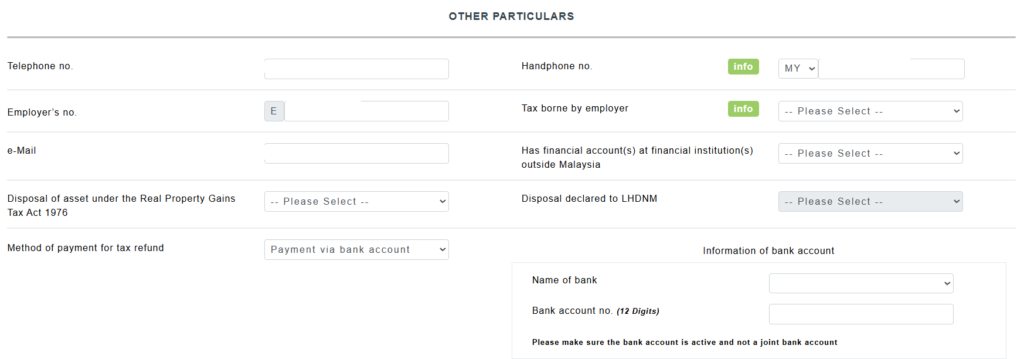
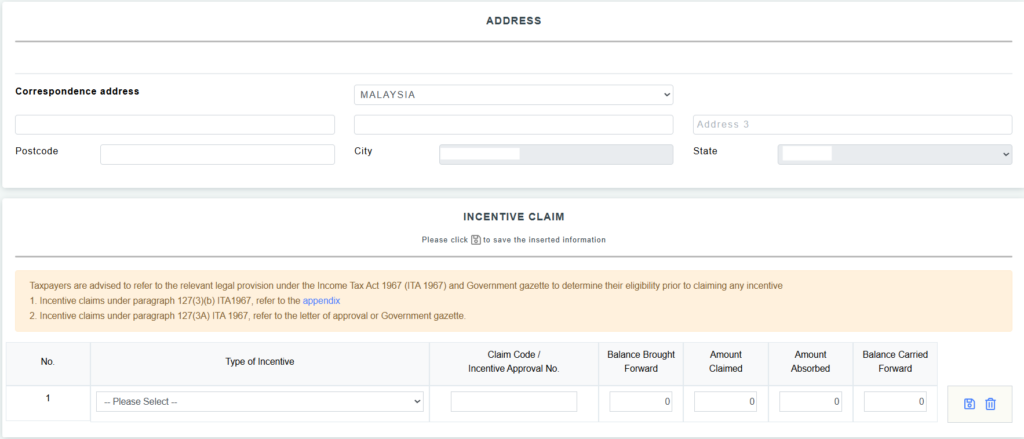
The system will pre-fill your personal details based on LHDN’s records. Review the following carefully:
- Full name and NRIC number
- Marital status (update if changed in 2025)
- Correspondence address
- Bank account number (this is where your refund will be paid — make sure it is accurate)
Make any necessary corrections before proceeding.
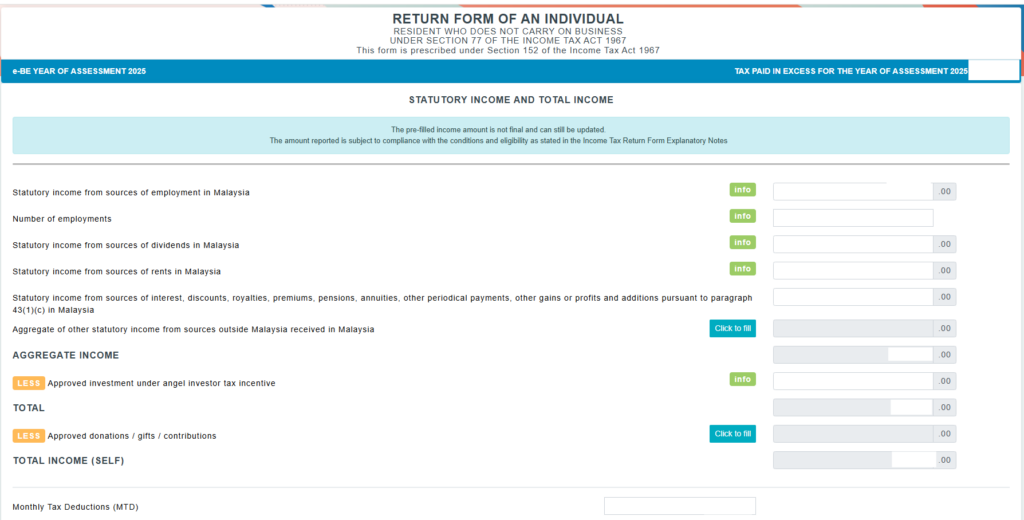
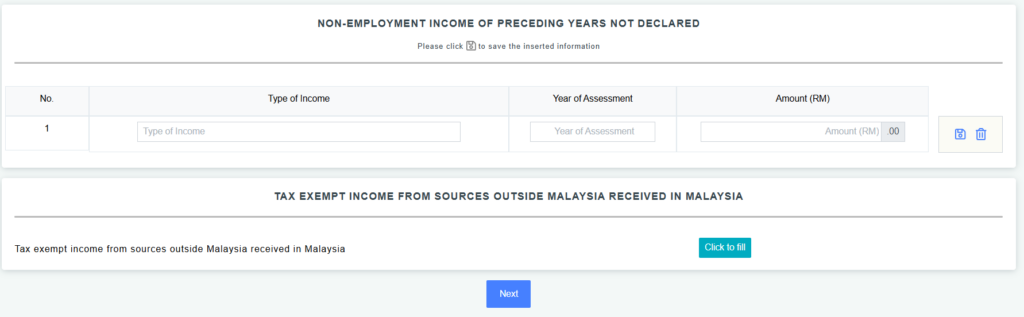
Step 5: Enter your employment income
Navigate to the Income section of the form and enter your total employment income for YA 2025.
Refer to your EA Form for the exact figures:
- Gross employment income (total salary, bonuses, allowances)
- Benefits-in-kind (BIK) — enter the value as stated in your EA Form
- Value of living accommodation (if applicable)
- Exempt income — some allowances and perquisites are fully or partially tax-exempt; Section F of your EA Form will distinguish these
Do not manually estimate these figures — use the exact amounts from your EA Form to avoid discrepancies.
Step 6: Claim your tax reliefs
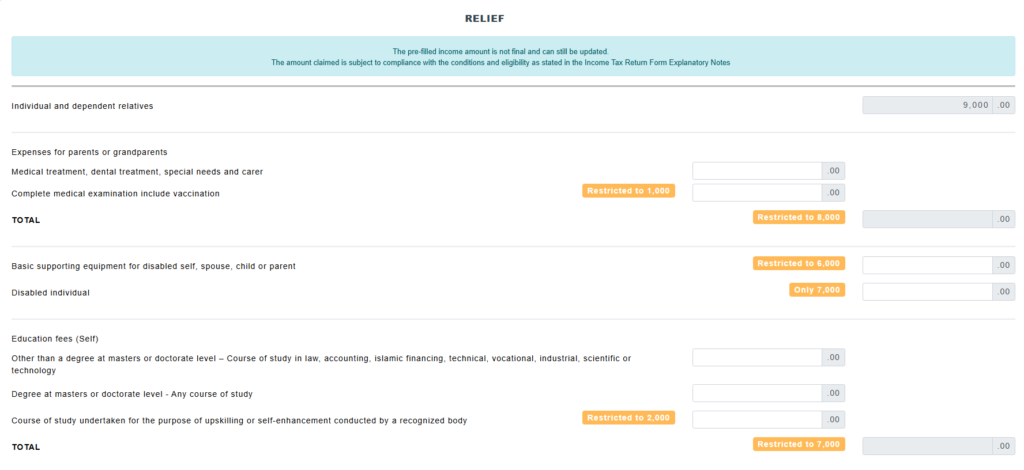
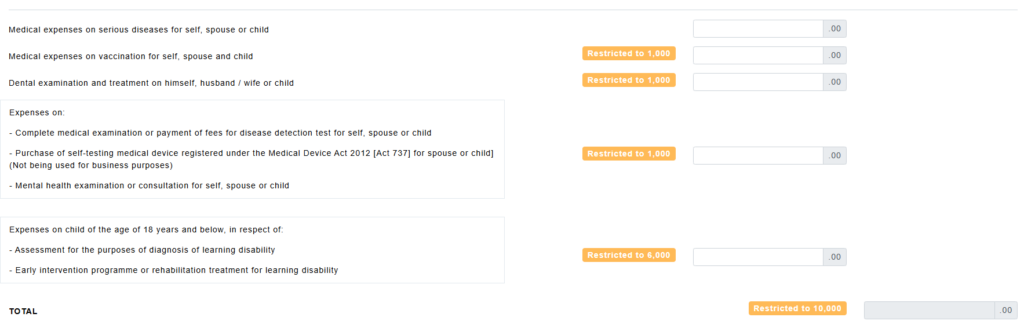
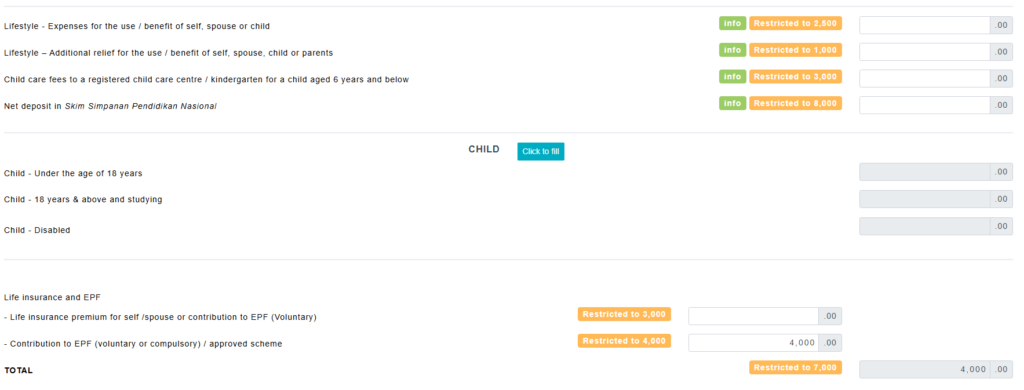
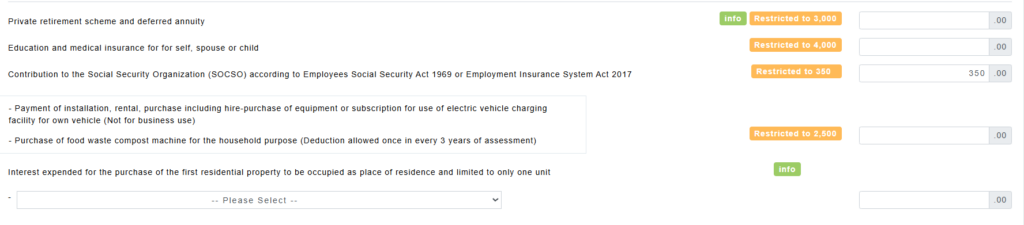
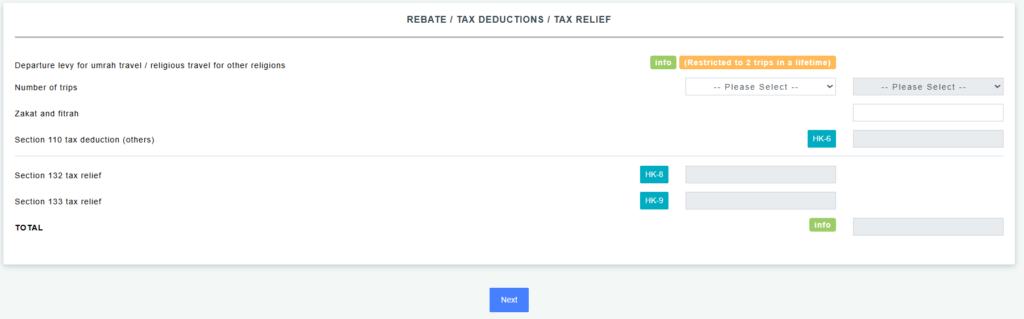
This is one of the most important steps. Tax reliefs reduce your chargeable income, which directly lowers the amount of tax you owe (or increases your refund).
READ MORE: Tax reliefs you can claim for YA 2025 and how to maximise your tax savings
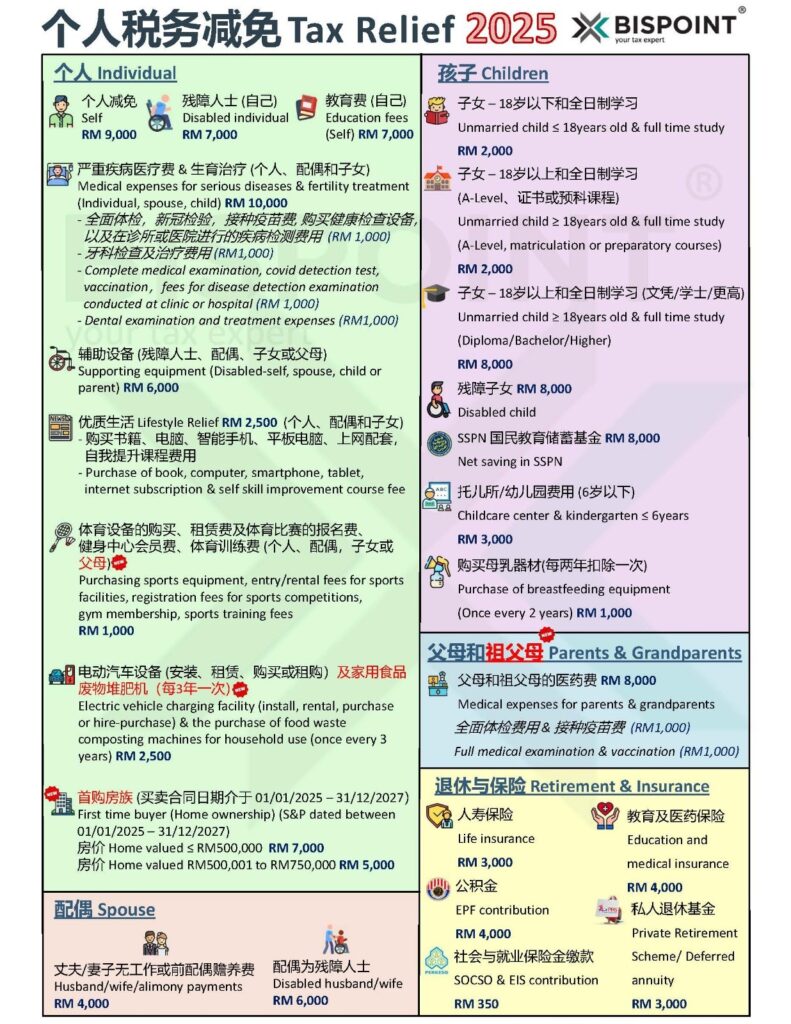
Enter each relief in the relevant section of the form and keep your supporting receipts on file for at least 7 years in case of an LHDN audit.
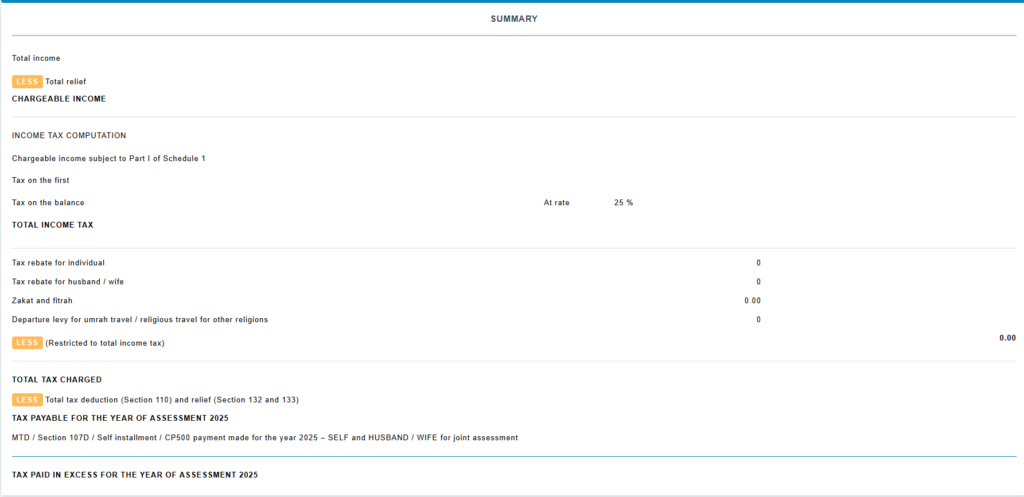
Step 7: Review the summary
Before submitting, take time to review the Summary Page carefully. It will show:
- Total income declared
- Total reliefs claimed
- Chargeable income
- Tax payable (calculated automatically)
- MTD / PCB already paid
- Net tax payable or refund amount
Check all figures against your EA Form and receipts. Errors at this stage are easier to correct before submission than after.
Step 8: Sign and submit
Once satisfied that all information is accurate, click “Sign and Submit”. The system will ask you to re-enter your NRIC number and password to verify your identity.
After submission, you will be taken to an acknowledgement page confirming your filing. Download or print a copy of this acknowledgement and your submitted Form BE — keep these records for at least 7 years.
Step 9: Pay any outstanding tax (if applicable)
If your calculation shows that you owe additional tax beyond what was deducted via MTD, you need to settle the balance by 15 May 2026 (Follow e-filing deadline).
Payment can be made via:
- ByrHASiL — online payment through the MyTax portal using FPX (bank transfer)
- ATM or internet banking — search for the bill number via e-Billing under MyTax > ezHasil Services
What Happens If You File Form BE Late?
Filing Form BE after the deadline has real consequences under the Income Tax Act 1967 (ITA 1967).
Late filing penalties
| Scenario | Common Practice (Administrative) | Legal Maximum (Statutory) |
| Incorrect Return (S113) | 15% / 30% / 45% penalty based on offence record. 0% for “Technical Adjustments.” | RM1k – RM10k fine AND 200% penalty of tax undercharged. |
| Late Filing (S112) | 15% (within 12 months); 30% (12–24 months); 45% (> 24 months). | Fine of RM200 – RM20,000 or 6 months jail, or both. |
| Late Payment (S103) | Flat 10% surcharge on the unpaid balance. | 10% surcharge. (The extra 5% was abolished in 2021). |
| Voluntary Disclosure | 10% – 15% penalty (if disclosed before an audit begins). | N/A |
Form BE vs Form B (Quick Comparison Table)
| Form BE | Form B | |
| Who files it | Salaried employees with employment income only | Individuals with business or freelance income |
| Side income allowed? | No — any business or freelance income disqualifies you | Yes — covers all income types |
| e-Filing deadline | 30 April 2026 (grace: 15 May 2026) | 30 June 2026 (grace: 15 July 2026) |
| Paper filing | Not accepted (e-Filing only) | Not accepted (e-Filing only) |
| Income sources declared | Employment income, BIK, allowances, rental income | Employment + business income, expenses, rental |
FAQs About Form BE Malaysia
Q: Do I need to file Form BE even if my employer already deducted MTD from my salary?
Yes. MTD (Monthly Tax Deduction) is a prepayment of your estimated tax liability and not final tax position — it does not replace the requirement to file an income tax return. If your annual income exceeds the taxable threshold, you must file Form BE regardless of whether MTD was deducted.
Q: I do some freelance work on the side of my employment income. Can I still file Form BE?
No. If you earned any freelance, commission-based, or business income in YA 2025, you must file Form B instead of Form BE. There is no minimum threshold for this — even a single freelance payment requires you to use Form B.
Q: I lost my EA Form. Can I still file?
Contact your HR department or payroll team to request a replacement EA Form. Your employer is legally required to provide it. Do not estimate your income figures — use the exact amounts from your EA Form to ensure accuracy.
Q: Can I file Form BE on my phone?
Yes. MyTax is accessible via mobile browser at mytax.hasil.gov.my. LHDN also has an official MyTax mobile app, which supports login, filing, and the e-KYC face recognition feature for password resets and digital certificate renewal.
Q: What if I made a mistake after submitting?
You can apply for an amendment online via MyTax (e-Application for Amended BE), usually available from 1 April annually. If your error cannot be corrected online, you may submit an Amended Return Form to your LHDN branch within six months of the original submission deadline — but only if you filed your original return on time.
Q: My income is below the taxable threshold. Do I still need to file?
If your total income (after EPF deduction and the RM9,000 individual relief) is below the taxable threshold, you technically may not owe any tax — but you may still be required to file if you are a registered taxpayer. It is generally advisable to file anyway, as it maintains your tax record, entitles you to any refund owed, and avoids potential compliance issues.

