


Step-by-step portal guide for Malaysian employees
As of 8 July 2026, contributing to SOCSO Lindung 24 Jam (Skim Kemalangan Bukan Bencana Kerja, SKBBK) is voluntary for Malaysian employees. This guide shows you exactly how to:
- Opt out of the scheme if you do not wish to contribute; and
- Choose which employer deducts your contribution if you have more than one employer.
NOTE: Everything is done through the PERKESO LINDUNG portal at lindungfaedah.perkeso.gov.my. The portal is in Bahasa Malaysia; the English meaning of each button is given in brackets throughout.
How to Opt Out of Lindung 24 Jam (and Get Your Notice of Release of Liability)
For Malaysian employees only. Foreign employees cannot opt out as the scheme remains mandatory for them. Once you have opted out, give a signed copy of the notice to your employer so payroll can stop the deduction.
Section 1 – Register or log in to the LINDUNG portal
Step 1: Go to the portal
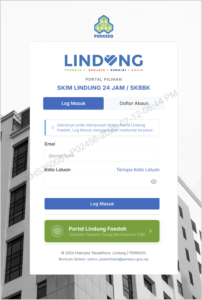
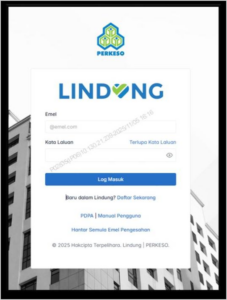
Visit https://lindungfaedah.perkeso.gov.my/auth/. If you already have an account, click ‘Log Masuk’ (Log In). If not, register first (Step 2).
Step 2: Register a new account
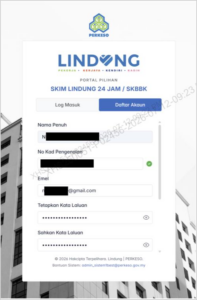
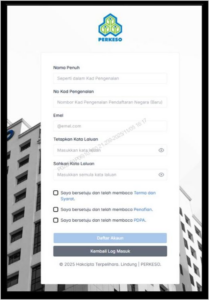
Click ‘Daftar Akaun’ (Register Account) and fill in your Full Name (as in your IC), IC Number, and Email, then set a Password (at least 8 characters and 1 symbol such as @#$%^&*). Tick the terms checkbox and click ‘Daftar Akaun’.
Step 3: Registration successful
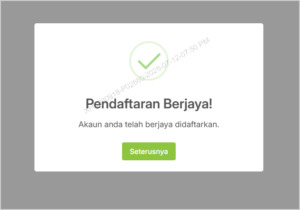
The screen displays ‘Pendaftaran Berjaya!’ (Registration Successful). Click ‘Seterusnya’ (Next).
Section 2 – Submit your opt-out declaration
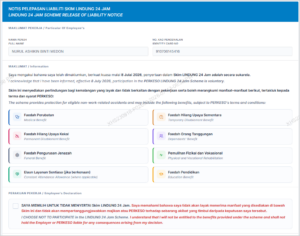
Step 4: Choose NOT to participate
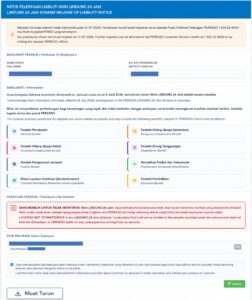
On the Employee Declaration (Notis Pelepasan Liabiliti), read the list of benefits you would give up. Then tick the box ‘SAYA MEMILIH UNTUK TIDAK MENYERTAI Skim Lindung 24 Jam’ (I choose NOT to participate in the Lindung 24 Jam Scheme).
Step 5: Confirm and submit
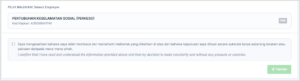
Confirm your employer, tick the confirmation box (‘I confirm that I have read and understood the information… my decision is made voluntarily and without any pressure or coercion’), then click ‘Hantar’ (Submit).
Step 6: Confirm on the pop-up
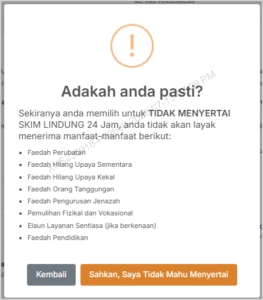
A pop-up ‘Adakah anda pasti?’ (Are you sure?) lists the benefits you will lose. Click ‘Sahkan, Saya Tidak Mahu Menyertai’ (Confirm, I do not want to participate). To go back, click ‘Kembali’ (Back).
Step 7: Declaration submitted
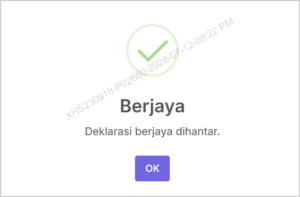
The screen shows ‘Berjaya – Deklarasi berjaya dihantar’ (Success – Declaration submitted). Click ‘OK’.
Step 8: Download your notice
Click ‘Muat Turun’ (Download) to save your Notice of Release of Liability (Notis Pelepasan Liabiliti).
Step 9: Give a signed copy to your employer
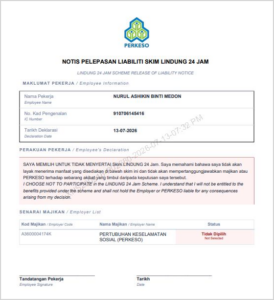
For your employer’s records, sign the downloaded notice and write the declaration date shown on the portal, then hand a copy to your employer so payroll can stop your SKBBK deduction. A sample of the notice is shown below.
Alternative Method- Submit the Manual Form
If you prefer not to use the online portal, you can complete the printed ‘Notis Pelepasan Liabiliti Skim Kemalangan Bukan Bencana Kerja (SKBBK) / Lindung 24 Jam’ form, sign it, and submit it through your employer / PERKESO. The manual form carries the same voluntary declaration:
“I confirm that I have read and understood the information provided above and that my decision is made voluntarily and without any pressure or coercion.”
(Attach the official PERKESO manual form to this guide when you publish or distribute it.)
How to Select Your Employer (If You Have More Than One Employer)
If you work for more than one employer, you must nominate ONE employer to deduct and remit your SKBBK contribution. This is done in the LINDUNG portal under ‘Pemilihan Majikan’ (Employer Selection). Registration for this step uses e-KYC – you will upload your IC and take a selfie.
Section 1 – Register and verify your account
Step 1: Log in to the portal
Visit https://lindungfaedah.perkeso.gov.my. New users click ‘Daftar Sekarang’ (Register Now).
Step 2: Fill in your details
Enter your Full Name (as in your IC), IC Number, Email, and Password (at least 8 characters and 1 symbol such as @#$%^&*). Tick the Terms & Conditions (Terma & Syarat) and PDPA consent boxes, then click ‘Daftar Akaun’ (Register Account).
Step 3: Activate via email
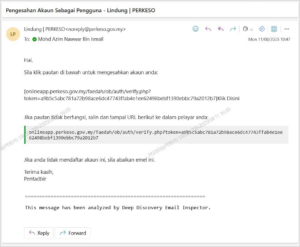
You will receive an account-activation email. Click ‘Klik Disini’ (Click Here) in the email to activate your account. If the link does not work, copy the URL shown into your browser.
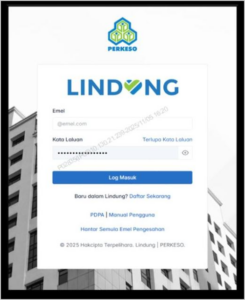
Step 4: Log in
Your email and password are filled in automatically. Click ‘Log Masuk’ (Log In).
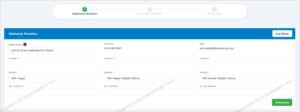
Step 5: Complete your applicant details
Fill in the Applicant Information (Maklumat Pemohon) and click ‘Seterusnya’ (Next).
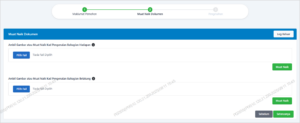
Step 6: Upload your IC
Upload clear photos of the FRONT and BACK of your IC (MyKad). Make sure the images are sharp and readable.
Step 7: Take a selfie
Take a selfie for identity verification and keep your face inside the green circle.
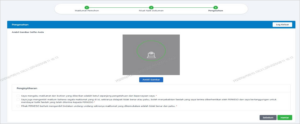
Step 8: Confirm and finish registration
Tick the declaration confirmation box and click ‘Hantar’ (Submit). The screen shows ‘Berjaya – Tahniah, pendaftaran anda lengkap’ (Success – your registration is complete). Click ‘OK’.
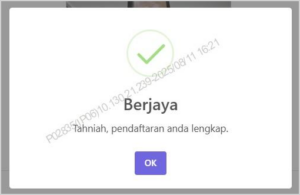
Section 2 – Select Your Employer
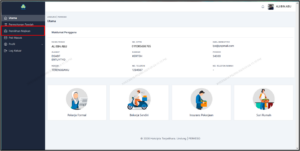
Step 9: Open Employer Selection
On your dashboard, click the ‘Pemilihan Majikan’ (Employer Selection) tab to choose which employer will deduct your Lindung 24 Jam contribution.
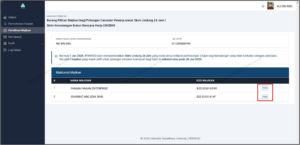
Step 10: Choose ONE employer
Your registered employers are listed on screen. Select ONE only by clicking ‘Pilih’ (Select) next to that employer.
Step 11: Submit your choice
After selecting, click ‘Hantar’ (Submit).
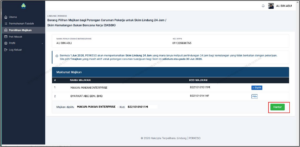
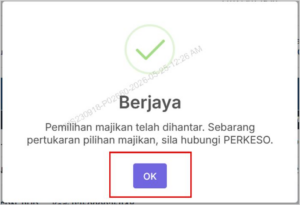
Step 12: Confirm
Click ‘OK’ to confirm. Note: to change your selected employer later, you must contact PERKESO directly.
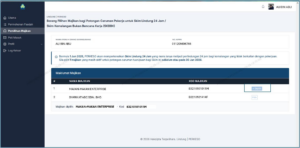
Step 13: Done – employer selected
Your chosen employer now appears with the tag ‘Dipilih’ (Selected). That employer will deduct and remit your SKBBK contribution.
Official References
- PERKESO LINDUNG portal – lindungfaedah.perkeso.gov.my
- PERKESO official website – www.perkeso.gov.my
- PERKESO Careline – 1-300-22-8000
This guide is for general information only and does not constitute legal, tax, or financial advice. Portal screens follow the official PERKESO user manuals (July 2026) and may change; always verify against the latest PERKESO guidance.

